by sean@higheredcareercoach.com | Jan 28, 2013 | Job Search, Resumes and CVs
Think of your resume as a ticket. It gets you in the door. That’s it.
A good resume captures and keeps the attention of the person reading it, and creates in that person a desire to know more about you. Hopefully, that desire will lead the reader to seek out more information about you and to put your candidacy into context. This could mean that the reader goes on to read your cover letter. It could mean that you get invited to interview for the position. But it’s not likely that someone will just read your resume and offer you a job.
Resumes are used by employers for screening candidates, but interviews are used for selecting the best qualified person for the job.
If you’ve never been on the hiring side of the table, the screening process may be foreign to you. So let’s dive into that part of the process and try to understand it.
The Screening Process
Screening can happen in many different ways.
- A single person might do it.
- A committee might do it.
- Sometimes, a machine might do it. (Initially.)
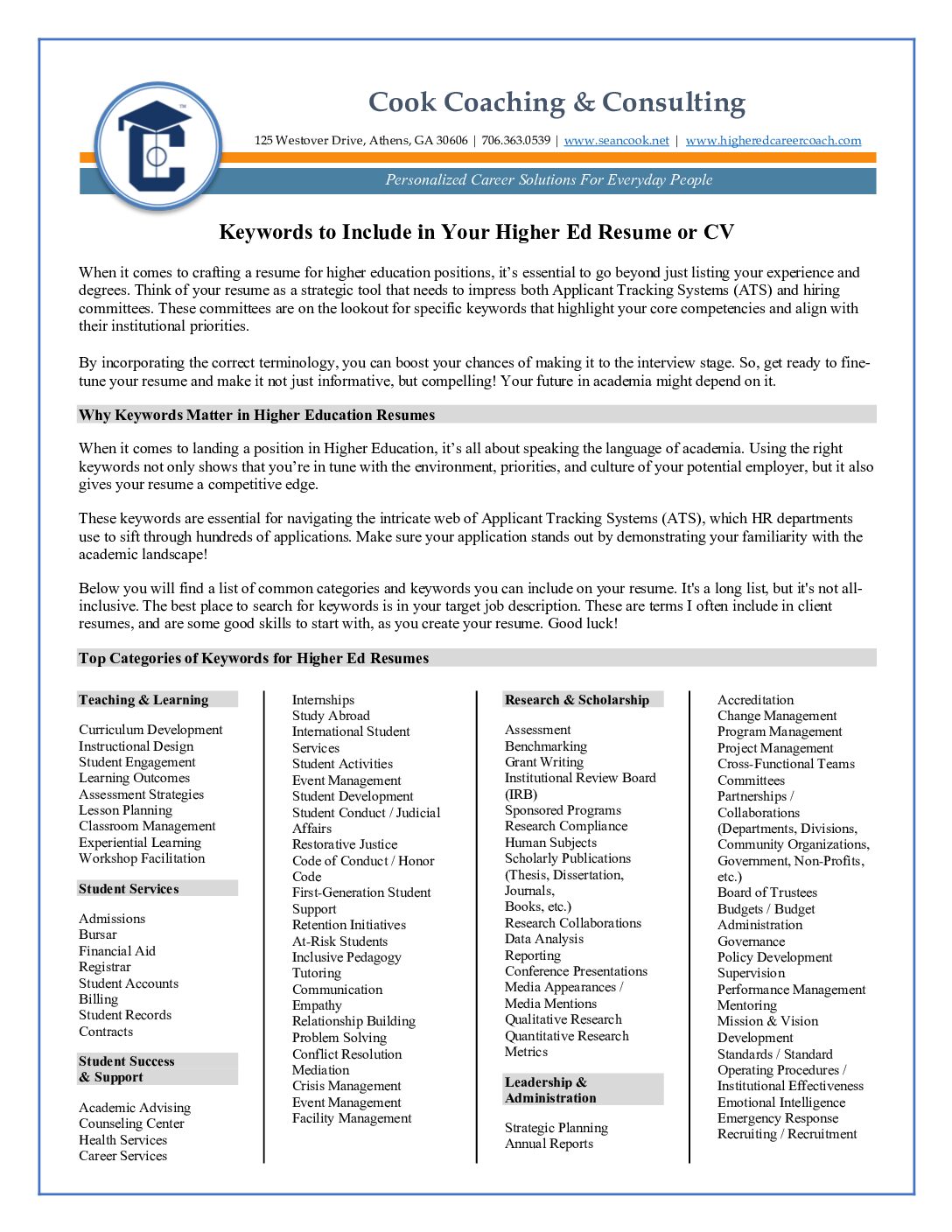
But let’s not confuse the issue. They are all looking for the same things. You might call them keywords or key concepts or key phrases, but essentially they are the same thing.
A keyword is not the same thing, necessarily, as a “buzzword.” It can be, but it really depends. Many job seekers spend time consulting websites, resume books, and their colleagues and mentors about what the latest hot topics are in their industry. The difference between a “buzzword” and a keyword is this: a “buzzword” is a word that everyone is talking about; it may or may not relate to the position you are applying for; a keyword is a term that relates directly to the specific role to be played, and therefore, is directly relevant.
It’s important to recognize the difference between these two concepts. One (using “buzzwords”) is a cynical ploy that may lack coherence; the other (using keywords) is a smart, strategic move that brings together the aspects of your unique offering, and shows the match between what you offer and the employer’s needs.
I’m often asked by job seekers if I have a great list of keywords for jobs in higher education, and I tell them that I do not have a comprehensive list. In fact, I think it would be a disservice to develop one and put it out there as the end-all, be-all guide. In a later post, I’ll tell you why I feel that way, and give you some practical tips on ways find the best keywords for your target position. But next, we’ll delve further into screening processes, how they work, and how they might break down.
This post is adapted from my e-book “7 Points to a Winning Resume,” which I am adapting into a resume-writing crash course, for those who can’t afford to hire a professional resume writer, or who simply want to write a better resume on their own. Over the next couple of weeks, we’ll delve into resume and CV writing strategies, though additional excerpts from the e-book, and guest posts from professional resume writers and career coaches.
Like this:
Like Loading...

by sean@higheredcareercoach.com | Oct 23, 2012 | Job Search, Resumes and CVs, Take 5
When it comes to landing the job of your dreams, you need to ensure your resume is up to par. Don’t just throw together information on a piece of paper, but work to incorporate pertinent information that applies to the job you’re seeking.
Some of the top tips for creating the perfect resume are outlined below:
10 Tips to Bullet Proof Your Resume from Free Resume Tips
Create Content that Showcases Your Abilities – Beyond the design, you need to ensure you have content that sells your abilities and skills. The information provided within your resume will help determine how many interviews you are going to receive, as well as the salary compensation you will earn on the job.
Resume Writing Tips from Resume Help
Use Action Words – Using action words helps your resume to stand out among all of the other applicants. Don’t use the same verbs on a continual basis; make sure to switch up the verbs you use. If your computer goes through an electronic scanning, the action words help the computer to recognize your resume and pick it out of the crowd. Some companies are using computers to pull only those resumes that have certain words incorporated into them, which is why it is imperative to utilize the correct words in the document.
44 Resume Writing Tips from Daily Writing Tips
Proofread Your Resume Twice – Many people fail to realize the importance of proofreading. All it takes is one simple typo and your chances of landing that dream job are down the drain. Even though you may think you only need to proofread your document once, you need to do it at least two or more times.
Top Ten Resume Writing Tips from About.com
Include All Pertinent Contact Information – When compiling your resume, it is imperative that you include all contact information for a potential employer. Be sure to list your name, full address, home phone number, cell phone number and your email address. Leaving out pertinent contact information could mean the loss of a great working opportunity.
Resume Writing Tips from Resume.com
Presentation – Ensure your resume is presentable. You will want the document to be clean and free of errors. There is no room for any grammatical or spelling errors. Always have someone else look at your resume before submitting it to someone else. A fresh set of eyes may be just what you need to catch any little errors that could be costly in the end.
Like this:
Like Loading...

by sean@higheredcareercoach.com | Sep 17, 2012 | Job Search, job search tools, Resumes and CVs
When I became a Certified Professional Resume Writer a couple of years ago, I had never heard of an Applicant Tracking System, or ATS. I knew that many companies used software packages to allow candidates to upload their applications, and had used Penn State’s HR system as a member of several screening committees. That system was pretty basic, allowing committee members to view applications online as they screened them in whatever way their department prescribed, but if it had higher-level functions, we didn’t use them.
It wasn’t until I began following a discussion on a resume writers’ discussion forum that I learned how widespread Applicant Tracking Systems are, and how they can be used to mine data and determine a candidate’s match to a position. I left the discussion, though, with a clear understanding that I needed to learn more about these systems, if I wanted to be a better resume writer.
I’m still unclear on how colleges and universities are using Applicant Tracking Systems, and hope to interview some Human Resources professionals soon to learn more, but I have come to the conclusion that it is always best to write your resume with both the human reader and the computer in mind.
Computers and Humans Use Different Logic
Writing for a computer forces you to apply some different logic than writing for a human. I had learned this already in my efforts to understand Search Engine Optimization (SEO) and get better rankings on Google for my websites. Computers parse information differently than a human reader does. In some ways, software can be less forgiving than a human reader. As a result, simple mistakes in formatting, style, or word choice can cause the ATS to misinterpret information and return a low score for your match to a position. If you don’t get past the ATS, a real human might not see your resume!
For the past few months, I have been using a tool called Resumeter that emulates an Applicant Tracking System, and can help you identify the potential matches and gaps between your resume and a position description or job posting. It can also return reports that show you where errors in formatting are confusing the ATS, so you can reduce the possibility of information on your resume being misinterpreted or skipped over altogether.
Using a tool like this one takes some patience, because Applicant Tracking Systems are “smart enough to be dumb.”
Five things you need to keep in mind, and how to work around them:
- Keywords matter. Applicant Tracking Systems apply some of the same principles that a search engine does. In particular, they look for keywords. When parsing information out of a document, an ATS will find exact matches, but may indicate information is missing, if it does not find an exact match. Some systems will give partial credit for related terms, some will not. Work-around: To maximize the possibility of being seen as a match, use the exact words you see in a position description or advertisement, whenever you can honestly and accurately do so.
- Applicant Tracking System software is logical but not reasonable. I’ve had to learn when to edit the job description down to only the most important keywords (almost always). Since the software will be applying rules, not reason, you sometimes have to step in and apply kind of a “reasonable person” test and take your best guess at whether a term is a “required” term, a “preferred” term, or just some word that was stuck in there. This requires using the tool, seeing what the tool is not finding, and then going back to read the position description in context. Sometimes the tool is looking for a more complex word where you may have used a simpler one. Work-around: When this happens, you can change the word on your resume to the exact one being sought, or you can edit the job description in the tool to search for the simpler word instead, and hope that it won’t count against you in an actual application process.
- Repeating yourself is a good thing. One thing I used to do when writing resumes was switch up wording here and there, because I played similar roles across different jobs. I didn’t want to bore the reader by seeming repetitive. Throw that idea out the window! Applicant Tracking Systems, like search engines, score documents higher based on keyword density. So if you are applying to be an academic advisor, for example, don’t put in one bullet that you “advised” students and in another bullet that you “assisted” students. If you “advised” them here and “advised” them there, then maybe you can “advise” them anywhere. Work-around: Use the word they are looking for whenever it applies, and you will get better results than going for variety.
- Inconsistent formatting will confuse the software. Applicant Tracking Systems will parse information out of sections of your document, by looking for words commonly used in Headings, or words that seem to be headings (For example, single words in all capital letters or underlined and set apart from other information.) The ATS may find a blank line and interpret it as a section break. One area where I see this often is in the “Education” section. Let’s say that you have an advanced degree and wrote a thesis, so you list it under the graduate degree, maybe inset by a tab. Then you list your bachelor’s degree but do not have a parallel section there. Even worse, you have more than one graduate degree and you list your thesis the same way for both. I’ve seen the ATS get confused and start mismatching degrees to institutions and dates, and I’ve seen it think that the thesis was a separate degree and note it as missing dates and the issuing institution. Work-around: Tweak the format within each section and eliminate any extra line breaks, until the ATS at least records the correct degrees, dates and institutions, even if it lists some of the other information as “additional education.” Or you can move your thesis information into a “publications” or “research” section.
- Where (and how) you list skills matters to the Applicant Tracking System. If you have many skills that you would like to list, you may be tempted to use a table. It’s a legitimate way to get a lot of information into a document. But there are legitimate reasons to list your skills in bullets, under specific positions. First, it helps in interpreting your skills in context. Second, many ATS systems give credit for one year of experience for each mention of a skill in a skills list, but will estimate length of experience listed in position-related bullets by looking at the dates you were in a position. They can tally up skills mentioned under multiple positions, and give a much better approximation of your experience. Work-around: Put skills in position-related bullets whenever possible. Some ATS systems are confused by table formatting, and will skip tables altogether, which means that whatever you listed in the skipped table won’t count toward your potential match score. Work-around: If you use a skills list, do not use the “table” function in Word. Use the columns setting instead, or make columns using the tabs.
I’ll be writing some more posts soon about Applicant Tracking Systems, and how candidates can write their resumes to get through computerized screening measures. In the meantime, please share this article with anyone you think might be interested, and post your questions and comments.
Like this:
Like Loading...

by sean@higheredcareercoach.com | May 4, 2012 | Job Search, Podcast, Resumes and CVs

Click for Image
Your resume gets you in the door. Or it doesn’t. It won’t get you a job. Its role is to get you noticed.
In this week’s episode of the Higher Ed Career Coach Show on BlogTalkRadio, I’ll be talking about the art and science of resume writing, and give an overview of the 7 points included in my recent e-book.
We’ll also discuss ATS (Applicant Tracking Systems) and explore tools and tips to help you tackle the challenge of writing a keyword-rich resume.
I will also take calls from those with questions about resumes and provide a brief overview of my resume writing and career coaching packages.
Please join me for the podcast by clicking the episode link or listening with the player in the sidebar at right.
If you’d like to call in, the number is (347) 989-0055, or you can use the Skype “S” click-to-talk button from the episode page to connect via Skype.
Like this:
Like Loading...

by sean@higheredcareercoach.com | Mar 21, 2012 | Infographic Tuesday, Job Search, Resumes and CVs
Today’s infographic is an illustration of the main points in my recent e-book “7 Points to a Winning Resume.” The e-book is available here and is now marked down permanently to $7. As before, it includes a $25 coupon, which can be used toward resume services or for coaching packages. Contact me for more information if you are interested.
Melissa is traveling this week, and we didn’t get a chance to connect on this week’s projects, so we did not have an infographic yesterday. I do hope that we can continue running infographics (ours, as well as those from other great sites) on Tuesdays, and that we’ll have the “Take 5” posts each Thursday, featuring recommendations for great articles worth reading, as you plan your job searches and your career development.
7 Points to a Winning Resume

Suggestions Welcome
If you have ideas for infographics you would like to see on the site, please send in your suggestions to Melissa Judy, Content Development Intern, at melissa@higheredcareercoach.com.
Guest Posts and Guest Infographics
Higher Ed Career Coach also accepts infographics as guest posts. The information presented must be relevant to our readership, and publication is at the sole discretion of the publisher. Topics related to job searching, the job market in higher education, educational funding, coaching skills for faculty and administrators, and using social media for job searching are especially relevant. For more information, contact Sean at sean@higheredcareercoach.com.
Like this:
Like Loading...

by sean@higheredcareercoach.com | Jan 30, 2012 | hiring, Job Search, Resumes and CVs
 A good résumé captures and keeps the attention of the person reading it, and creates in that person a desire to know more about you. Hopefully, that desire will lead the reader to seek out more information about you and to put your candidacy into context. This could mean that the reader goes on to read your cover letter, if they haven’t already. It could mean that you get invited to interview for the position. But it’s not likely that someone will just read your résumé and offer you a job.
Résumés are used by employers for screening candidates, but interviews are used for selecting the best qualified person for the job. So think of your resume as a ticket. It gets you in the door, so you can continue making a case for your candidacy.
If you’ve never been on the hiring side of the table, the screening process may be foreign to you. So let’s dive into that part of the process and try to understand it.
Screening can happen in many different ways.
- A single person might do it.
- A committee might do it.
- Sometimes, a machine might do it. (Initially.)
But let’s not confuse the issue. They are all looking for the same things. You might call them keywords or key concepts or key phrases, but essentially they are the same thing.
A keyword is not the same thing, necessarily, as a “buzzword.” It can be, but it really depends. Many job seekers spend time consulting websites, résumé books, and their colleagues and mentors about what the latest hot topics are in their industry. The difference between a “buzzword” and a keyword is this: a “buzzword” is a word that everyone is talking about; it may or may not relate to the position you are applying for; a keyword is a term that relates directly to the specific role to be played, and therefore, is directly relevant.
It’s important to recognize the difference between these two concepts. One (using “buzzwords”) is a cynical ploy that may lack coherence; the other (using keywords) is a smart, strategic move that brings together the aspects of your unique offering, and shows the match between what you offer and the employer’s needs.
This post is an adapted excerpt from my e-book, 7 Points to a Winning Resume, which is available for $10 and comes with a $25 discount you can apply toward a resume-writing or career coaching package.
Click here to buy now!
Like this:
Like Loading...