by sean@higheredcareercoach.com | Jan 30, 2013 | hiring, Job Search, Resumes and CVs
How Will You Stand Out from the Crowd?
Once a job application arrives at an employer’s office, the screening process can begin. As mentioned before, screening might be done by a single person, by a group of persons, or by a machine. You may not know which approach a company takes, unless you ask specifically about how screening is done in the department or division where an opening exists.
There may also be nuances between writing for a machine and writing for human. Lacking information specific to a particular type of screening software, job seekers must do their best to present their arguments in language that can be easily filtered by both human and machine.
Let’s imagine a “typical” screening process, discuss some possible stages in that process, and then imagine some strategies that might be useful for capturing and keeping the reader’s attention.
It’s probably impossible to give one explanation that will cleanly and accurately describe all the nuances to different stages of the job search process, but let’s try to describe some generalities.
I have been on many screening and selection committees during my career, and I’ve seen a few thousand résumés during that time. My explanation of the screening process is heavily drawn on my personal experience. In no way should it be construed that my experiences are somehow universal. However, I do believe that I can bring some insights about how résumé screeners and job search committees might conduct their screening processes.
A “Typical” Screening Process
In my experience, screening works like this:
- Application packets arrive at the employer. This usually happens these days via e-mail or through a database-driven form that is part of an online application system.
- Some companies may use software to scan your documents or keywords and phrases before a real person takes a look at. This is less common in small businesses, non-profit organizations, local governments, and academic institutions.
- Other companies may allow a recruiter or members of a search committee to view a candidate’s materials as soon as they are available in the system, and to rank them.
Keywords/Scanning/Rubrics
Whether your résumé is screened by a person or by a computer, some sort of ranking system will likely be used to determine the degree of “fit” between the candidate and a fictional “ideal” candidate. Such a system relies heavily upon the use of scoring rubrics, which are much like the guides that a teacher might follow in grading a standardized test.
Ideally, the screeners use a scoring rubric to rate each candidate on their match to minimum and preferred qualifications. Ideally, those members of the committee follow those guidelines and come up with a list that accurately reflects the match between each candidate and the stated needs of the employer.
Ideally. Not always in practice. But ideally.
In the next post in this series, we’ll explore ways the screening process might break down, and what you might be able to do to minimize the possibility that you will be screened out of a process.
Like this:
Like Loading...

by sean@higheredcareercoach.com | Jan 28, 2013 | Job Search, Resumes and CVs
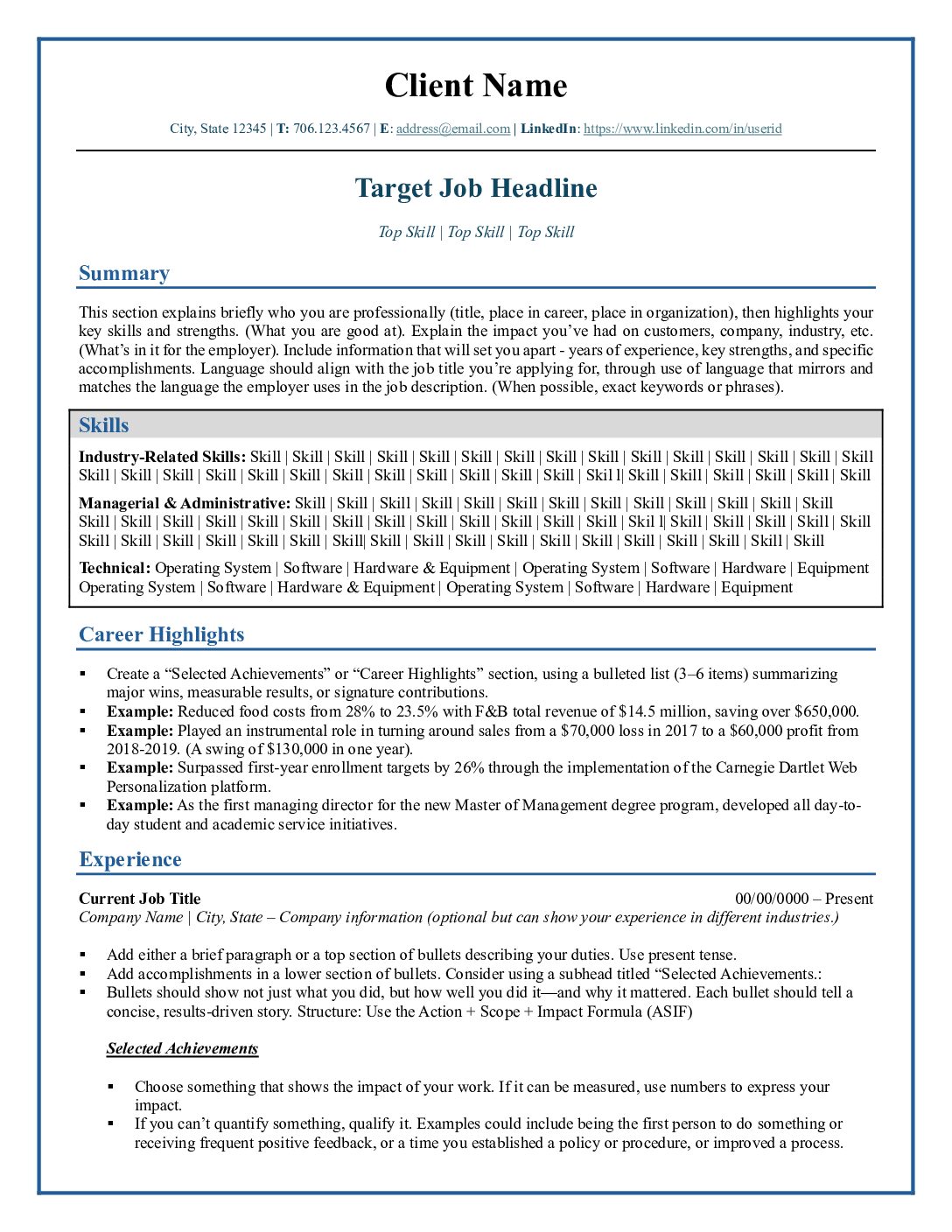
Think of your resume as a ticket. It gets you in the door. That’s it.
A good resume captures and keeps the attention of the person reading it, and creates in that person a desire to know more about you. Hopefully, that desire will lead the reader to seek out more information about you and to put your candidacy into context. This could mean that the reader goes on to read your cover letter. It could mean that you get invited to interview for the position. But it’s not likely that someone will just read your resume and offer you a job.
Resumes are used by employers for screening candidates, but interviews are used for selecting the best qualified person for the job.
If you’ve never been on the hiring side of the table, the screening process may be foreign to you. So let’s dive into that part of the process and try to understand it.
The Screening Process
Screening can happen in many different ways.
- A single person might do it.
- A committee might do it.
- Sometimes, a machine might do it. (Initially.)
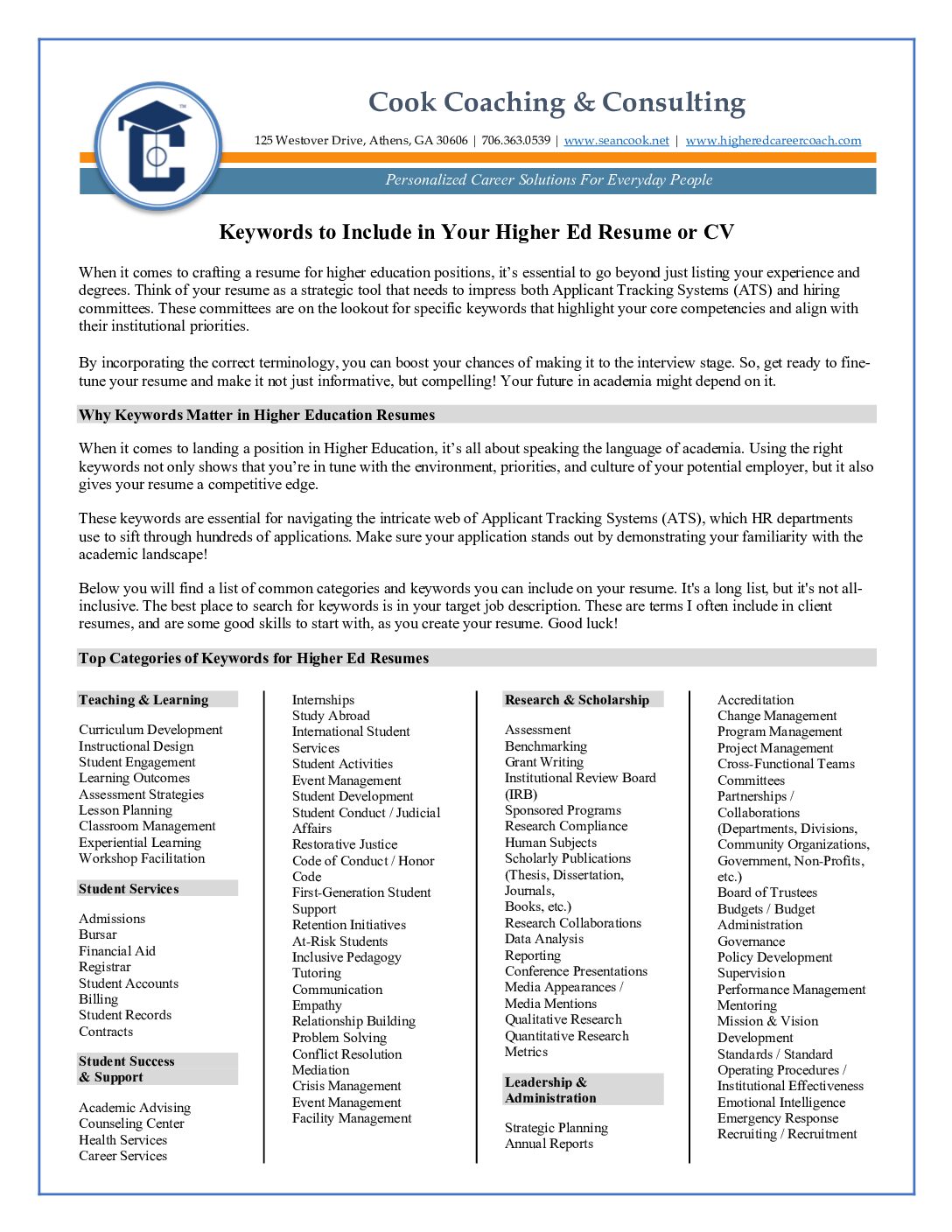
But let’s not confuse the issue. They are all looking for the same things. You might call them keywords or key concepts or key phrases, but essentially they are the same thing.
A keyword is not the same thing, necessarily, as a “buzzword.” It can be, but it really depends. Many job seekers spend time consulting websites, resume books, and their colleagues and mentors about what the latest hot topics are in their industry. The difference between a “buzzword” and a keyword is this: a “buzzword” is a word that everyone is talking about; it may or may not relate to the position you are applying for; a keyword is a term that relates directly to the specific role to be played, and therefore, is directly relevant.
It’s important to recognize the difference between these two concepts. One (using “buzzwords”) is a cynical ploy that may lack coherence; the other (using keywords) is a smart, strategic move that brings together the aspects of your unique offering, and shows the match between what you offer and the employer’s needs.
I’m often asked by job seekers if I have a great list of keywords for jobs in higher education, and I tell them that I do not have a comprehensive list. In fact, I think it would be a disservice to develop one and put it out there as the end-all, be-all guide. In a later post, I’ll tell you why I feel that way, and give you some practical tips on ways find the best keywords for your target position. But next, we’ll delve further into screening processes, how they work, and how they might break down.
This post is adapted from my e-book “7 Points to a Winning Resume,” which I am adapting into a resume-writing crash course, for those who can’t afford to hire a professional resume writer, or who simply want to write a better resume on their own. Over the next couple of weeks, we’ll delve into resume and CV writing strategies, though additional excerpts from the e-book, and guest posts from professional resume writers and career coaches.
Like this:
Like Loading...

by sean@higheredcareercoach.com | Jan 24, 2013 | Job Search, networking, Social Networking, Take 5
 One aspect of career planning that is sometimes overlooked is the importance of networking, both in the real world and online. Statistically, only a fraction of available higher education positions are publicly advertised, so it is critical to cast a wide net in your job search. Online networking can help job seekers connect to advocates and decision-makers.
Here are some great tips to help you put your name and credentials out there and land the right job!
- Start with those who know you best, but don’t be afraid to branch out. The people who can help you most are those who know you best. Let your friends, family, and professional colleagues know you’re on the hunt. Not only can they provide you with valuable leads, they can introduce you to others and help you expand your network. Online networking is a great way to keep in contact with former coworkers, employers, and classmates, and enlist their assistance.
- Learn to use social media effectively. Social media is a great tool for network building if you learn to use it right. Join professional outlets such as LinkedIn and actively engage other social outlets such as Twitter and Facebook. This is a good way to reach out to other professionals in your industry, reestablish contact with former associates, keep your network informed, and stay current on trends in your industry. It is also a good idea to do routine checks of your online presence. Google yourself on a regular basis to look for inconsistencies and false or unflattering information. Prospective employers are turning to web searches more often to check out job candidates ahead of time. Remember that what you do and say online can come back to haunt you.
- Reciprocity is key. Networking is a give and take relationship, not a one way street. Share ideas and information with your network. Actively engage in forums, blogs, and other online communities. Add benefit to your interactions with others in your network, but do so with sincerity and integrity.
- Narrow your focus and follow up. Know exactly what you’re looking for before you look to your network for help and information. Monitor your social media time as well. Remember that these sites are great online networking tools and don’t get caught up in the social aspect of the medium. While these sites are fun and interesting, they are sometimes also a drain on your time and productivity. Make sure to follow up any leads from your network with diligence. Information is only helpful if you use it, and it helps you to maintain credibility. People are less willing to recommend someone who lacks commitment and follow through.
- Network for the long term. Networking should never considered be a quick solution to job placement, but a means of building ongoing professional relationships.
Online networking isn’t about applying pressure or asking for favors. Networking is an excellent way to make contacts and establish professional relationships that are fulfilling and mutually beneficial. Extending your professional network to cyberspace is an excellent way to expand your contact base beyond your immediate geographic location and increase your exposure in the job market.
Like this:
Like Loading...

by sean@higheredcareercoach.com | Oct 23, 2012 | Job Search, Resumes and CVs, Take 5
When it comes to landing the job of your dreams, you need to ensure your resume is up to par. Don’t just throw together information on a piece of paper, but work to incorporate pertinent information that applies to the job you’re seeking.
Some of the top tips for creating the perfect resume are outlined below:
10 Tips to Bullet Proof Your Resume from Free Resume Tips
Create Content that Showcases Your Abilities – Beyond the design, you need to ensure you have content that sells your abilities and skills. The information provided within your resume will help determine how many interviews you are going to receive, as well as the salary compensation you will earn on the job.
Resume Writing Tips from Resume Help
Use Action Words – Using action words helps your resume to stand out among all of the other applicants. Don’t use the same verbs on a continual basis; make sure to switch up the verbs you use. If your computer goes through an electronic scanning, the action words help the computer to recognize your resume and pick it out of the crowd. Some companies are using computers to pull only those resumes that have certain words incorporated into them, which is why it is imperative to utilize the correct words in the document.
44 Resume Writing Tips from Daily Writing Tips
Proofread Your Resume Twice – Many people fail to realize the importance of proofreading. All it takes is one simple typo and your chances of landing that dream job are down the drain. Even though you may think you only need to proofread your document once, you need to do it at least two or more times.
Top Ten Resume Writing Tips from About.com
Include All Pertinent Contact Information – When compiling your resume, it is imperative that you include all contact information for a potential employer. Be sure to list your name, full address, home phone number, cell phone number and your email address. Leaving out pertinent contact information could mean the loss of a great working opportunity.
Resume Writing Tips from Resume.com
Presentation – Ensure your resume is presentable. You will want the document to be clean and free of errors. There is no room for any grammatical or spelling errors. Always have someone else look at your resume before submitting it to someone else. A fresh set of eyes may be just what you need to catch any little errors that could be costly in the end.
Like this:
Like Loading...

by sean@higheredcareercoach.com | Oct 10, 2012 | Career Tracks, Career Transitions, Higher Education, Job Search, Student Affairs
 Like most people who end up working in Student Affairs, I didn’t imagine my career when I was a child. I wasn’t even aware that Student Affairs was a career. And, once I chose it as a career, I realized that many people still think it isn’t one.
Texas A & M’s Department of Educational Administration and Human Resource Development has a great humor page, where I found the Top 10 reasons you became a Student Affairs professional, and I particularly connected with #3 . . .
“You enjoy the challenge of trying to tell people what you do for a living.”
The last time I think my parents really understood what I did for a living, I was a resident assistant. And for many of my friends and acquaintances, that is pretty much what they thought I did, up until I left my last formal position in Student Affairs (Assistant Director of Residence Life at Penn State University.) I was in college for a living, and I settled roommate problems and busted people for drinking. (Which many acquiantainces thought was irony in action, on both counts, but that is a story for another day.)
Academics and “serious” professionals don’t know what to make of us, either. For example, Wikipedia’s current entry for Student Affairs has a section on criticism of the field which reads, in part…
“The field of Student Affairs has been criticized for its emphasis on formal, professional training, calling into question whether the field is theoretical or practical. Complicating this criticism is the question of the role of student development theories in student affairs practice. It is claimed that student development theories are used to “proactively identify and address student needs, design programs, develop policies, and create healthy…environments that encourage positive growth in students.”
“Yet, often student affairs practices often bear little resemblance or connection to student development theories. As Paul Bloland (1979) wrote in an article in the NASPA Journal, “We have cultivated an expertise that was not requested, is not sought out, and for which there is little recognition or demand. Many entry-level and (many) seasoned professionals know little of student development theory and practice and, in fact, do not really need such expertise to meet the role expectations of their supervisors or, in too many instances, their institutions.”
Yet, for almost 20 years now, I have planned my life around the idea that Student Affairs is a career. In 2009, I left a stable job to venture out on my own, and establish a career coaching practice dedicated to helping others pursue their passions for working with students and find their own niche in Student Affairs. My perspective is that Student Affairs is actually a calling, within which you will find many career tracks. And it isn’t for everybody. I actually think it is the responsibility of those in the field to both recruit people with potential, and to “counsel out” out those who don’t have the passion and the fortitude to do the work. It’s no kindness to someone to show only the benefits, and none of the sacrifices, that go along with the profession.
In his song “Mr. Bad Example,” Warren Zevon recalled many career exploits of the song’s protagonist, and like those who work in Student Affairs, the protagonist clearly wore many hats, including the following…
“…worked in hair replacements, swindling the bald, where very few are chosen, and fewer still are called.”
The same could be said about Student Affairs. Very few are chosen, and fewer still are called. And I don’t think that a love of student development theory is required for success. I don’t care much about academics, or about student development theory, but I do know that Student Affairs is a calling, and that you can make a great career in it, if you are passionate about working with young people, and believe that helping people find their way is a worthy pursuit, you may be cut of the right material. But only if you have the strength of will and character to ignore the assaults on your dignity, your professional worth and your profession. They come with this line of work. The only thing that is truly important is that you know who you are and what you are about. If you are meant to serve students, you will. It’s just a matter of time. And in many cases, of strategy. If it’s meant to be, you will find your way. Just know, in the meantime, that many are in your corner, and have been in your place, before you. And we are here to help.
October is Careers in Student Affairs month. In honor of this, I am offering a coaching package for new professionals, to help them get off to a good start. It includes the following:
- A professionally written resume, geared toward your preferred target positions ($85 value)
- LinkedIn C0aching Package (1 hour LinkedIn training, plus profile optimization advice ($50 value)
- Practice interview, by phone or Skype ($85 value)
- One additional coaching session ($85 value)
- Access to an online job search group, with activities, lessons, and a private discussion board): $50 value
Purchased separately, this package would be $355, but this deal gives you nearly 30% off! For only $250, you get all of the above, including 6 months of access to the group, and any additional workshops or activities added to the job search group.
I’m opening this deal up only to new professionals (either those finishing school and looking for their first job, or with less than 5 years of professional experience). Availability is limited, and this special will not be repeated.
Sign up now!
This offer is no longer available.
Like this:
Like Loading...

by sean@higheredcareercoach.com | Sep 17, 2012 | Job Search, job search tools, Resumes and CVs
When I became a Certified Professional Resume Writer a couple of years ago, I had never heard of an Applicant Tracking System, or ATS. I knew that many companies used software packages to allow candidates to upload their applications, and had used Penn State’s HR system as a member of several screening committees. That system was pretty basic, allowing committee members to view applications online as they screened them in whatever way their department prescribed, but if it had higher-level functions, we didn’t use them.
It wasn’t until I began following a discussion on a resume writers’ discussion forum that I learned how widespread Applicant Tracking Systems are, and how they can be used to mine data and determine a candidate’s match to a position. I left the discussion, though, with a clear understanding that I needed to learn more about these systems, if I wanted to be a better resume writer.
I’m still unclear on how colleges and universities are using Applicant Tracking Systems, and hope to interview some Human Resources professionals soon to learn more, but I have come to the conclusion that it is always best to write your resume with both the human reader and the computer in mind.
Computers and Humans Use Different Logic
Writing for a computer forces you to apply some different logic than writing for a human. I had learned this already in my efforts to understand Search Engine Optimization (SEO) and get better rankings on Google for my websites. Computers parse information differently than a human reader does. In some ways, software can be less forgiving than a human reader. As a result, simple mistakes in formatting, style, or word choice can cause the ATS to misinterpret information and return a low score for your match to a position. If you don’t get past the ATS, a real human might not see your resume!
For the past few months, I have been using a tool called Resumeter that emulates an Applicant Tracking System, and can help you identify the potential matches and gaps between your resume and a position description or job posting. It can also return reports that show you where errors in formatting are confusing the ATS, so you can reduce the possibility of information on your resume being misinterpreted or skipped over altogether.
Using a tool like this one takes some patience, because Applicant Tracking Systems are “smart enough to be dumb.”
Five things you need to keep in mind, and how to work around them:
- Keywords matter. Applicant Tracking Systems apply some of the same principles that a search engine does. In particular, they look for keywords. When parsing information out of a document, an ATS will find exact matches, but may indicate information is missing, if it does not find an exact match. Some systems will give partial credit for related terms, some will not. Work-around: To maximize the possibility of being seen as a match, use the exact words you see in a position description or advertisement, whenever you can honestly and accurately do so.
- Applicant Tracking System software is logical but not reasonable. I’ve had to learn when to edit the job description down to only the most important keywords (almost always). Since the software will be applying rules, not reason, you sometimes have to step in and apply kind of a “reasonable person” test and take your best guess at whether a term is a “required” term, a “preferred” term, or just some word that was stuck in there. This requires using the tool, seeing what the tool is not finding, and then going back to read the position description in context. Sometimes the tool is looking for a more complex word where you may have used a simpler one. Work-around: When this happens, you can change the word on your resume to the exact one being sought, or you can edit the job description in the tool to search for the simpler word instead, and hope that it won’t count against you in an actual application process.
- Repeating yourself is a good thing. One thing I used to do when writing resumes was switch up wording here and there, because I played similar roles across different jobs. I didn’t want to bore the reader by seeming repetitive. Throw that idea out the window! Applicant Tracking Systems, like search engines, score documents higher based on keyword density. So if you are applying to be an academic advisor, for example, don’t put in one bullet that you “advised” students and in another bullet that you “assisted” students. If you “advised” them here and “advised” them there, then maybe you can “advise” them anywhere. Work-around: Use the word they are looking for whenever it applies, and you will get better results than going for variety.
- Inconsistent formatting will confuse the software. Applicant Tracking Systems will parse information out of sections of your document, by looking for words commonly used in Headings, or words that seem to be headings (For example, single words in all capital letters or underlined and set apart from other information.) The ATS may find a blank line and interpret it as a section break. One area where I see this often is in the “Education” section. Let’s say that you have an advanced degree and wrote a thesis, so you list it under the graduate degree, maybe inset by a tab. Then you list your bachelor’s degree but do not have a parallel section there. Even worse, you have more than one graduate degree and you list your thesis the same way for both. I’ve seen the ATS get confused and start mismatching degrees to institutions and dates, and I’ve seen it think that the thesis was a separate degree and note it as missing dates and the issuing institution. Work-around: Tweak the format within each section and eliminate any extra line breaks, until the ATS at least records the correct degrees, dates and institutions, even if it lists some of the other information as “additional education.” Or you can move your thesis information into a “publications” or “research” section.
- Where (and how) you list skills matters to the Applicant Tracking System. If you have many skills that you would like to list, you may be tempted to use a table. It’s a legitimate way to get a lot of information into a document. But there are legitimate reasons to list your skills in bullets, under specific positions. First, it helps in interpreting your skills in context. Second, many ATS systems give credit for one year of experience for each mention of a skill in a skills list, but will estimate length of experience listed in position-related bullets by looking at the dates you were in a position. They can tally up skills mentioned under multiple positions, and give a much better approximation of your experience. Work-around: Put skills in position-related bullets whenever possible. Some ATS systems are confused by table formatting, and will skip tables altogether, which means that whatever you listed in the skipped table won’t count toward your potential match score. Work-around: If you use a skills list, do not use the “table” function in Word. Use the columns setting instead, or make columns using the tabs.
I’ll be writing some more posts soon about Applicant Tracking Systems, and how candidates can write their resumes to get through computerized screening measures. In the meantime, please share this article with anyone you think might be interested, and post your questions and comments.
Like this:
Like Loading...