Have a Question? Call Now.

(706) 363-0539

More on Hiring Cycles: Planning Your Student Affairs Job Search

More on Hiring Cycles: Planning Your Student Affairs Job Search

Earlier this month, we covered the importance of understanding typical academic hiring cycles when searching for faculty roles. It’s equally important while searching for a job in Student Affairs, but the rhythm of the year is a bit different.

As noted in the previous article, academia operates on a relatively predictable schedule, and job postings are tied closely to the academic calendar. Most institutions plan their staffing needs well in advance of the upcoming academic year.

Open Season: The Job Hunt Begins! Late Winter to Early Spring (January – May)

While fall is the peak season for faculty jobs, late winter to early spring (January through May) is the busiest hiring period for employment in Student Affairs. Most institutions examine their staffing needs between the end of one year and the beginning of the next, and plan to fill vacancies by late summer and early fall.

Job seekers can expect to start seeing job postings for the next academic year by January or February. Working backward, this means that individuals seeking a new role should refine their resumes and LinkedIn profiles, line up their references, and begin planning and budgeting in late fall or early winter (October through December) for a busy interview season, which typically picks up in March and April. Professional Associations like NASPA and ACPA hold their annual conferences, providing opportunities for networking. Some regional associations also post career resources and events on their websites, for those with geographic preferences.

TPE, The Placement Exchange, a joint venture of NASPA and ACUHO-I, is a virtual platform where job seekers can research opportunities, apply for vacancies, and have multiple interviews. Marketed as a resource for graduate students and early-to-mid-career professionals, TPE enables employers to set up virtual career booths and offer recruiting information, videos, documents, and links to institution-specific resources, including their institution’s job posting site and benefits information. Employers can post open jobs, receive applications, view applicants, message them, and schedule and conduct interviews through the TPE platform.

Candidates participating in TPE can attend a virtual career fair, schedule interviews during a designated scheduling week, and participate in interviews during a dedicated interview week. Registration for 2026 Virtual Placement begins on December 1, and TPE Virtual Placement dates are February 13 and February 23-27, 2026. For more information, visit the Virtual Placement page on the TPE website.


Phase 2: Interview Season
(March and April)

The next phase of the annual Student Affairs hiring cycle begins in March and April. By this time, many institutions have conducted initial screening interviews and started inviting candidates for second-round interviews. The way interviews unfold during this phase varies. For some positions, particularly early-career roles, the second interview may be the final interview. For more specialized roles and senior positions, the interview process may include different stages and include meetings with various campus stakeholders, including senior management. If an employer doesn’t provide clear explanations of the interview process and hiring timeline, candidates should request this information so they can plan their travel and work around other interview opportunities.

Phase 3: Offers and Acceptances (May through June)

For candidates, the next phase begins and (hopefully) rewards them for all their hard work. By May and June, many employers extend offers, especially for roles that start onboarding and staff training in July. This is common for Residence Life and other areas that welcome students to campus and support student activities and events that take place early in the academic year, such as Orientation, Student Activities, and Greek Life.

The Second Wave:
July Through October

What happens next? A second wave occurs in response to the departure of staff who accepted new opportunities. Many universities begin their fiscal years on July 1st and some do not advertise positions until the new fiscal year starts. Institutions will continue to post new vacancies in late summer through early fall (July through October).

In July and August, “Just-in-Time” hiring takes place to fill positions created by last-minute resignations or newly approved roles before the start of the fall semester. When I worked in Residence Life, I referred to this stage as the time we had a “warm body problem”: we needed to start the year strong, and (facetiously) this meant that we would hire any “warm body” to fill the vacancy. This is an oversimplification. Res Life folks often use sardonic comments to survive the challenges of the professional staff training-student staff training- orientation leader training-residence hall opening-welcome-week-and-everything-else season that ramps up in July and ends in exhaustion (or at some point in October).

Anyway, we wouldn’t take just any “warm body.” We would, however, consider less experienced candidates who showed promise, seemed trainable, and were ready and raring to go. Many of my best staff members joined the department during this time. If you end up being a “second wave” hire, don’t beat yourself up. You weren’t hired late because you weren’t competitive. You were hired late because you had the endurance to keep going.

The End

At the end of this phase, in September and October, there are fewer job postings, many of which are for specialized roles or unexpected vacancies. The academic year gathers steam, and eventually, the hiring cycle for the following year’s vacancies begins. If you are still looking for a job, know that being the best available option is a good thing. Keep the faith, and your opportunity will come. You’ll know your final destination when you get to the “end of the line.”

Some Final Thoughts


      • Be prepared for a long process. Due to committee approvals, university bureaucracy, and the need to coordinate multiple schedules, the timeline from application to an offer can take 4 to 6 weeks or longer.

      • October through December: Prepare your resume and optimize your LinkedIn profile. Line up your references. Plan your budget to be prepared for networking, placement events, and travel.

      • Begin your active search in January and prioritize high-volume application submissions and conference attendance through May to hit the primary cycle

      • If you can afford to attend conferences early in the year, use them as opportunities to meet other professionals, support other job seekers, and network. New connections can lead to new opportunities.

      • Participate in TPE. It is a structured, high-volume environment where candidates can complete multiple screening interviews with institutions in just a few days.

      • Be on the lookout for regional placement events or conferences. Smaller events may offer you opportunities to stand out in a smaller crowd. This is especially important if you are regionally bound.

      • If you are interested in a specific institution, visit their hiring page frequently in late Spring and early Summer. Many universities begin their fiscal years on July 1 and typically do not advertise positions until the new fiscal year starts.

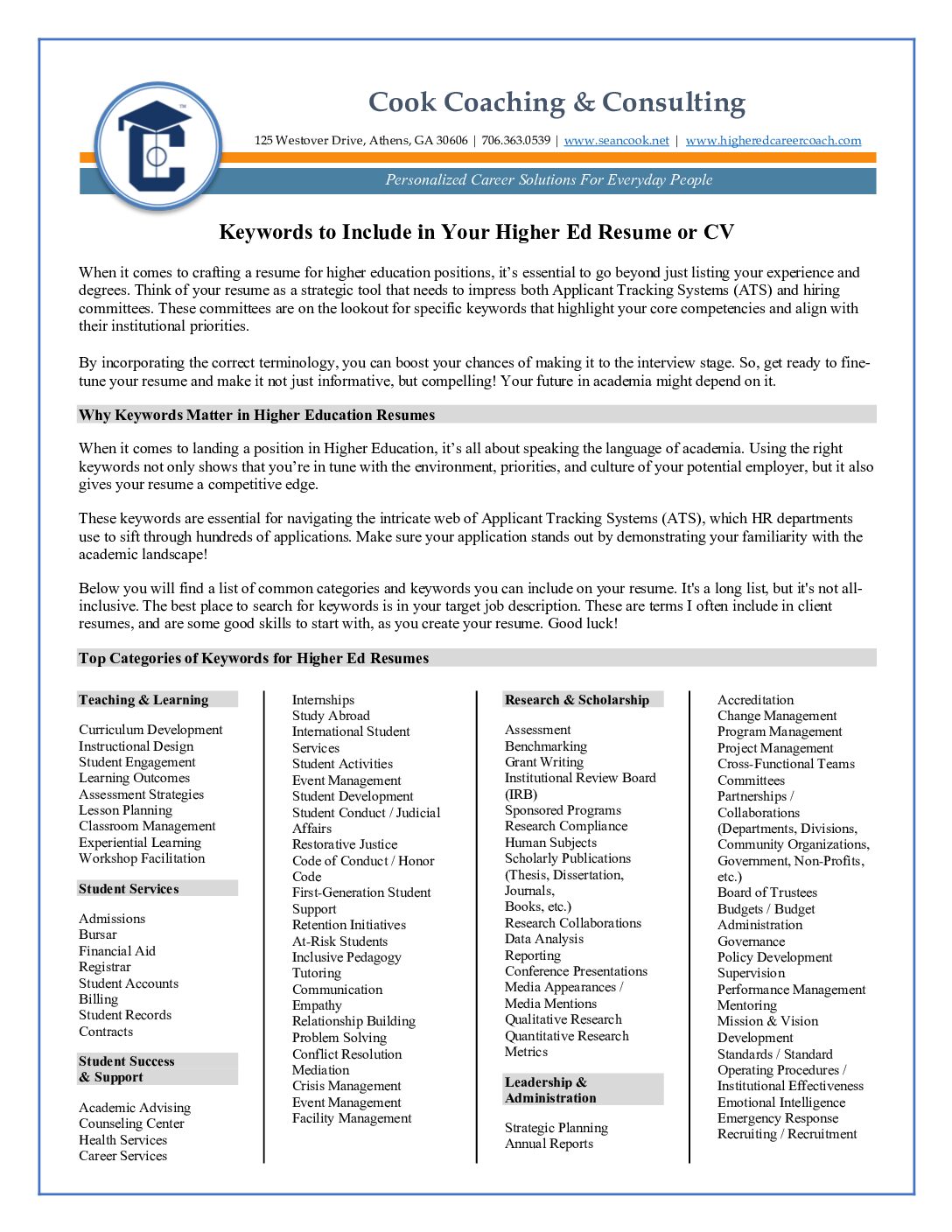
    Keywords to Include in Your Higher Ed Resume or CV

    Keywords to Include in Your Higher Ed Resume or CV

    When it comes to crafting a resume for higher education positions, it’s essential to go beyond just listing your experience and degrees. Think of your resume as a strategic tool that needs to impress both Applicant Tracking Systems (ATS) and hiring committees. These committees are on the lookout for specific keywords that highlight your core competencies and align with their institutional priorities.

    By incorporating the correct terminology, you can boost your chances of making it to the interview stage. So, get ready to fine-tune your resume and make it not just informative, but compelling! Your future in academia might depend on it.

    Why Keywords Matter in Higher Education Resumes

    When it comes to landing a position in Higher Education, it’s all about speaking the language of academia. Using the right keywords not only shows that you’re in tune with the environment, priorities, and culture of your potential employer, but it also gives your resume a competitive edge.

    These keywords are essential for navigating the intricate web of Applicant Tracking Systems (ATS), which HR departments use to sift through hundreds of applications. Make sure your application stands out by demonstrating your familiarity with the academic landscape!

    Below you will find a list of common categories and keywords you can include on your resume. It’s a long list, but it’s not all-inclusive. The best place to search for keywords is in your target job description. These are terms I often include in client resumes, and they are some good skills to start with, as you create your resume. Good luck!

    Top Categories of Keywords for Higher Ed Resumes

    Teaching & Learning

    • Curriculum Development
    • Instructional Design
    • Student Engagement
    • Learning Outcomes
    • Assessment Strategies
    • Lesson Planning
    • Classroom Management
    • Experiential Learning
    • Workshop Facilitation

    Student Success & Support

    • Academic Advising
    • Counseling Center
    • Health Services
    • Career Services
    • Internships
    • Study Abroad
    • International Student Services
    • Student Activities
    • Event Management
    • Student Development
    • Student Conduct / Judicial Affairs
    • Restorative Justice
    • Code of Conduct / Honor Code
    • First-Generation Student Support
    • Retention Initiatives
    • At-Risk Students
    • Inclusive Pedagogy
    • Tutoring
    • Communication
    • Empathy
    • Relationship Building
    • Problem Solving
    • Conflict Resolution
    • Mediation
    • Crisis Management
    • Event Management
    • Facility Management

    Student Services

    • Admissions
    • Bursar
    • Financial Aid
    • Registrar
    • Student Accounts
    • Billing
    • Student Records
    • Contracts

    Research & Scholarship

    • Assessment
    • Benchmarking
    • Grant Writing
    • Institutional Review Board (IRB)
    • Sponsored Programs
    • Research Compliance
    • Human Subjects
    • Scholarly Publications (Thesis, Dissertation, Journals, Books, etc.)
    • Research Collaborations
    • Data Analysis
    • Reporting
    • Conference Presentations
    • Media Appearances / Media Mentions
    • Qualitative Research
    • Quantitative Research
    • Metrics

    Leadership & Administration

    • Strategic Planning
    • Annual Reports
    • Accreditation
    • Change Management
    • Program Management
    • Project Management
    • Cross-Functional Teams
    • Committees
    • Partnerships / Collaborations (Departments, Divisions, Community Organizations, Government, Non-Profits, etc.)
    • Board of Trustees
    • Budgets / Budget Administration
    • Governance
    • Policy Development
    • Supervision
    • Performance Management
    • Mentoring
    • Mission & Vision Development
    • Standards / Standard Operating Procedures / SOPs
    • Institutional Effectiveness
    • Emotional Intelligence (EQ)
    • Emergency Response
    • Recruiting / Recruitment

    Advancement & External Relations

    • Alumni Relations / Alumni Affairs
    • Community Outreach
    • Corporate Relations
    • Development
    • Donor Relations
    • Fundraising
    • Government Relations
    • Legal Affairs
    • Public Relations
    • Regulatory Compliance (ADA, FERPA, Title IX, EEO, etc.)

    Diversity, Equity, & Inclusion (DEI)

    • Inclusive Excellence
    • Multicultural Programming
    • Equity Initiatives
    • Accessibility
    • Community Engagement
    • Cultural Sensitivity
    • Intercultural Communication
    • Culturally Responsive
    • Bias Mitigation
    • Employee Resource Groups
    • Campus Climate
    • Learning Environment
    • Work Environment
    • Stakeholder Engagement / Stakeholder Relations

    Auxiliary & Business Services

    • Athletics
    • Bookstore
    • Campus Dining / Food Services
    • Catering
    • Housing / Residence Life / On-Campus Living
    • Marketing
    • Public Safety
    • Parking
    • Recreation / Intramurals
    • Document Services / Printing Services
    • Purchasing
    • Human Resources
    • Training / Training & Development
    • Facility Management

    Technology & Innovation

    • Learning Management Systems (LMS) – Blackboard, Canvas, Moodle, Etc.
    • Online Course Design
    • Educational Technology
    • Data-Informed Decision Making
    • Virtual Learning Environments
    • Database Management
    • User Experience (UX)
    • Dashboard Development
    • Social Media Management
    • Google Analytics

    Common Software and Web Platforms

    • Microsoft Office – Microsoft Word, Excel, PowerPoint, SharePoint, Teams, Microsoft 365
    • Google Apps (Google Workspace) – Google Docs, Sheets, Slides, Google Drive, Google Classroom
    • Design – Canva, Figma, Affinity Designer, Adobe Creative Suite – InDesign, Adobe Illustrator, Photoshop, Acrobat, Acrobat Reader, etc.
    • Meeting Platforms – Zoom, Google Meet, WebEx, Skype, GoToMeeting
    • Website Development: HTML, WordPress, Squarespace, Wix
    • Data Visualization – Tableau, PowerBI, Qlik, Google Looker
    • Data Collection and Management – Qualtrics, Access, SurveyMonkey, TypeForm
    • CRM: Slate, Salesforce Education Cloud, Ellucian CRM, Element 451, TargetX
    • Student Information Systems – Ellucian (Banner, Student), Workday Student, Jenzabar One, Salesforce Education Cloud, PeopleSoft Campus Solutions
    • Housing & Residence Life Platforms: StarRez, Entrata, eRezLife, Roompact, Creatrix Campus, SpaceBasic

    Other Common Keywords

    • Adaptability
    • Analytical Mindset
    • Growth Mindset
    • Attention to Detail
    • Collaboration
    • Coordination
    • Critical Thinking
    • Time Management
    • Customer Service
    • Teamwork
    • Leadership
    • Team Leadership
    • Operations
    • Planning
    • Organizing / Organizational Skills
    • Continuous Improvement / Process Improvement / Process Optimization
    • Alignment
    • Negotiation
    • Assess(ed)
    • Manage(d)
    • Create(d)
    • Implement(ed)
    • Execute(d)
    • Develop(ed), Development
    • Critical Thinking
    • Increased
    • Decreased
    • Drove / Drive
    • Facilitate
    • Create(d) / Creative / Creativity
    • Networking
    • Present(ed) / Presentation(s)
    • Flexible
    • Work Independently / Minimal Supervision / Self-Directed/ Self-Motivated

    How to Use These Keywords Effectively

    • Mirror the job posting: Adapt your resume by weaving in the exact terminology used in the description.
    • Be authentic: Only use keywords that accurately reflect your skills and experience.
    • Show impact: Combine keywords with measurable achievements (e.g., “Led curriculum development initiative that improved retention rates by 12%”).
    • Balance ATS and human readers: Don’t overstuff your resume; ensure it reads naturally and flows smoothly.

    Final Thoughts:

    Unlocking the next step in your higher education career begins with the right keywords—your ticket to capturing attention and making your resume shine. By crafting your document with intention and authenticity, you not only meet the expectations of today’s institutions but also showcase the unique value you bring. Approach your job search with confidence, knowing that each strategically chosen word brings you closer to new opportunities and professional growth. You’ve got this!

    Great Resources for Higher Education Career Advice

    If you would like this article as a handout, please support Higher Ed Career Coach by purchasing a PDF version below for $1.

    Keywords to Include in Your Higher Ed Resume or CV

    $1.00

    Keywords to Include in Your Higher Ed Resume or CV

    When it comes to crafting a resume for higher education positions, it’s essential to go beyond just listing your experience and degrees. Think of your resume as a strategic tool that needs to impress both Applicant Tracking Systems (ATS) and hiring committees. This document includes common categories and keywords you can include on your resume. If you would like to support this site, buy this document for $1.

    Work with Sean Cook – Intelligent Career Strategies for Higher Education Professionals
. I help higher ed professionals take control of their careers with tailored services including resume and CV development, LinkedIn profile optimization and networking strategy, interview coaching, and one-on-one career guidance. Whether you’re pursuing advancement in academia or exploring opportunities beyond the campus, I provide the tools and strategies you need to thrive in today’s competitive job market. For more information, visit https://www.seancook.net/. You can read recommendations from previous clients on my LinkedIn profile at https://www.linkedin.com/in/seanccook/. To schedule your complimentary 30-minute consultation, please use the Calendly widget below.

    The Applicant’s Role in the Screening Process

    The Applicant’s Role in the Screening Process

    What can a candidate do to affect the outcome of the screening process? Not much. You can’t set the search criteria for an employer. You can’t make screeners meticulously follow the criteria they have. And you can’t eliminate bias.

    You can only present a coherent argument and make sure that it highlights what you have to offer in relation to the position and the needs of an employer.

    How can you describe, explain, or imply a high degree of fit between you/your skills and the needs of your potential employer?
    It will not be through the use of buzzwords. It will be through the use of keywords. And the best way to discover the most relevant keywords is to study the employer, read the position description or advertisement carefully, and pull out those elements that seem most important. This introduces the value of “word-farming.”

    There are some great tools out there that can help you distill a job description down to the most important keywords. We’ll delve into them in a later post. For now, let’s start at the beginning. If you are going to make a coherent argument, you have to do one thing first…

    Know Your Goal

    Have you ever heard the term “He couldn’t hit the side of a barn?”
     It implies a lack of precision and lack of focus.

    How about “shooting from the hip?”
    It implies that a person engages in hasty, gut-level reactions, rather than taking carefully-considered and well-planned actions in an attempt to reach a goal.
    Let’s consider these metaphors and attempt to apply them to our thinking about the job search process.

    How specific is your job target? Is it the side of a barn, or the barn window?

    You see, shooting at the side of a barn is a really aimless activity. It doesn’t take much talent. You could almost do so by accident. Bored teenagers shoot paintballs at the side of a barn for something to do. A serious marksman wouldn’t bother. A marksman would shoot out the windows (or maybe the lights!)

    If you ever shot from the hip, it was probably during a moment of reaction, when you had your guard down, felt attacked or confronted, and responded immediately, in a way designed to help you deflect the arguments of your attacker, or to escape from an unpleasant situation. Is that really any way to approach your job search? Some job seekers browse job postings without specific job titles, employers, roles, or responsibilities in mind, taking an “I’ll know the right job when I see it” sort of attitude. If you aren’t imagining an ideal job or ideal roles, you’ll be less able to coherently present your arguments, and when interview time comes (if you are that lucky), you’ll be responding to questions in the same way. Shooting from the hip is a terrible way to interview.

    Aimless is as Aimless Does.

    I have a piece of paper tacked to the bulletin board above my desk that reads “Aimless is as aimless does.” It reminds me to set specific goals to hold myself accountable for reaching them.

    Notice that the key point is that your goal must be specific.

    Aim for a bullseye, not a barn.

    Would you really be happy just having any random job? Probably not.

    You might get by. You might pay your bills. You might even be able to do so for quite a while. But don’t you deserve more?

    Know Yourself First

    You are a unique person. No one else has seen the world through your eyes. No one else can bring the exact same mix of qualities to the table.

    There is a job out there that you are a perfect match for. And you aren’t going to find it if you view every opportunity equally.

    If you are going to have a great résumé, you need to have a goal in mind. My belief is that your goal should be to find an ideal job. Not just any job, but a job that is a good match for your education, skills, interests, and motivation.

    When I talk to clients who have been looking for an extended period, I usually see a common thread: lack of focus. They are shooting at the side of a barn, and wondering why no one’s giving out marksmanship trophies!

    So set a good goal. Make it as specific as possible (we’ll talk more about how to do this in a later post). And understand that you may not reach it.

    But, as Benjamin May once said:
    “The tragedy in life does not lie in not reaching your goal. The tragedy lies in having no goal to reach.”

    Where a Screening Process Might Break Down: The Human Factor

    Where a Screening Process Might Break Down: The Human Factor

    woman placing hands on cyber mapScreening by Humans

    The resume screening process can break down in a variety of ways. In this post, we’ll take a look at the human factor: how errors and bias on the part of persons involved in the screening process might affect your candidacy. 

    Screeners who just “wing it.” There are a couple of common ways this might happen. First, if it’s a single person, it could be that he or she has sole authority over hiring and thinks: “I’ll know what I like when I see it.” Or it could be that a supervisor has asked a person or committee to do the screening without giving any clear guidelines. In these cases, it is likely that there will be some loose criteria, but unless the person or committee comes up with some that are clear, it’s pretty much like “shooting at the side of a barn.”

    (Yes, employers are just as guilty of this as job-seekers!)

    Sometimes bias comes into play. Sometimes screeners ignore stated criteria in favor of their own “preferred” qualifications. At other times, a “preference” may be factored into the equation. For example, some employers have a preference for hiring and promoting from within, or through employee referral programs. Some give preference to those that come directly to a human resource officer than to those entered through the web. Some may give preference to candidates who apply through the company over those forwarded by job boards. And some individuals might give preference to people who went to the same school, were a member of an organization they like, or who they know through social connections.

    Sometimes, screeners are lazy or disorganized and skim hastily through the résumés. If it is because the person is lazy, there’s just no telling whether there will be a rhyme or reason to their picks. If it is because they are disorganized, they might give early applicants a more thorough review than those they review closer to the deadline.

    So what can you do, in the face of human errors and bias? Not much, really.

    • If a screener is just “winging it,” that is an internal issue for his employer to deal with, and it is well beyond your control. You’ll really never know if this is the case, so don’t spend a lot of time worrying about it. When someone is just making it up as they go along, it doesn’t matter how you’ve presented your arguments. It’s probably a blessing to not work with people who have such a loose grasp on such an important role.
    • You can never control for a screener’s bias. In fact, there is always some sort of bias at play. In the best cases, the bias is toward a candidate with certain skills or experiences. In the worst cases, the biases aren’t stated, but internalized by the candidate, and it’s likely they justified screening a candidate in or out based on some other grounds. The best way to deal with perceived bias is to tightly align your arguments with a potential employer’s known biases. When reading job announcements, look for the terms “preferred,” “would a plus,” “desired,” or “ideal.” if you lack any of the skills or experiences listed with these terms, you will be less competitive than candidate who have those skills and experiences. The best you can do is argue for transferability of skills, aptitude, and motivation.  So write your resume toward related skills and experiences, and describe them in ways that accurately depict your strengths in other areas, and your motivation to close any gaps. This can be done through re-writing bullet points and/or the professional summary on your resume, and through the cover letter. The strategy is simple. Acknowledge the gaps quickly and show how you would fill them, while also showing strong foundational skills in other key skill areas.
    • You can’t control a screener’s laziness or disorganization. But you can apply early (as soon as you see a position posted), and organize your documents in a clear concise manner, that brings the most important details up front and early, so the lazy screener gets en0ugh information from pre-screening the document’s top third of page 1 that they don’t have to read any further to make an initial decision. Basically, make it easy for a lazy person to quickly see what you have to offer.

    This post is part of a series adapted from my e-b0ok “7 Points to a Winning Resume.”  Next up in the series, we’ll explore the applicant’s role in the screening process, and how you can increase your possibility for  success.

    Where the Screening Process Might Break Down, Part 1: Applicant Tracking Systems

    Where the Screening Process Might Break Down, Part 1: Applicant Tracking Systems

    Where the Screening Process Might Break Down

    In any screening process, there is always room for error. In fact, there is always a degree of error. This applies to machine-driven processes and human-powered ones.

    Let’s talk about ways that each type of screening process might break down.

    Computer Screening Software

    Applicant Tracking Systems (also known as ATS) are highly sophisticated software packages that scan information in the résumé to determine the degree of match between an application and available positions. They do not simply look for keywords. Many can also read for terms in context, much like a human reader. For example, some screening programs are advanced enough to interpret how recent your experience is in a particular area, and rank you accordingly. Some can even relate relevant terms to other key terms or phrases. And they are at times a bit “picky” about how information is formatted. Some things to know about ATS that could result in your résumé being kicked out of the system, garbled, or ranked differently:

    • Keywords without context. Basically, this is what I mean when I say “buzzwords.” They are on the résumé, but it may not be clear why. Today’s ATS systems are smarter than that, and so you are less likely to be able to game the system through simply putting keywords in.
    • Graphic elements, including lines, boxes, tables, shading and non-standard fonts. These may be misunderstood by the ATS system and may result in your résumé coming back as garbled nonsense. Because of the volume of applications many employers receive, it’s not likely the recruiter will bother to follow up with a candidate whose résumé is unreadable. There are probably many qualified candidates that submitted materials that were readable.
    • Files submitted in the wrong format. Many systems ask for Word or pdf for a reason. Word (.doc) documents  are more easily read and scanned by the ATS systems. So submitting in another format might result in the résumé being flagged or ranked lower by the ATS. (for a great free online pdf converter, go here.)
    • Cutting and pasting a text version rather than uploading another acceptable format. This is simple enough: text files may come back with interesting errors in spacing or tabs. If you accidentally cut and paste HTML into a text field, your markups will result in a document coming back loaded with garbage. And even if these things don’t happen, anything you have conveyed or emphasized through formatting or design will be lost. If you are given the option, ALWAYS use the format that will convey both the content and design as you intended. These days. .pdf (portable document format, which is easily read by Adobe Acrobat Reader, Preview for Mac and many web browsers and word processors) is the standard. If given the option to upload a .pdf, do so. As such, both humans and machines will be able to read your content in context.

    In my practice as a Certified Professional Resume Writer, I use a tool that emulates a typical ATS and can estimate the potential match of a resume to a job posting, by:

    • Relating keywords between the documents,
    • Estimating how recently a candidate has used a skill, and
    • Estimating the length of experience with different skills.

    The tool also tells the user whether an ATS will have difficulty finding some information, which helps identify possible formatting errors that might result in the ATS having difficulty parsing out information. By using keywords that mirror and match the language of the employer, and eliminating formatting errors, a writer can make smart revisions that result in a highly targeted argument for a candidate’s potential match to an employer’s requirements.

    In the next installment in this series, we’ll explore the human factor: how human errors and bias can derail your candidacy during the screening process. This post is adapted from my e-book “7 Points to a Winning Resume,” which is available here. I am developing a brief resume-writing crash course based on this e-book, and will have details about that program in a later post.

    The Screening Process: How Recruiters Choose Candidates Worth Pursuing

    The Screening Process: How Recruiters Choose Candidates Worth Pursuing

    bigstockphoto_Penguins_Recruiting_Interview_1619040-e1310011767456

    How Will You Stand Out from the Crowd?

    Once a job application arrives at an employer’s office, the screening process can begin. As mentioned before, screening might be done by a single person, by a group of persons, or by a machine. You may not know which approach a company takes, unless you ask specifically about how screening is done in the department or division where an opening exists.

    There may also be nuances between writing for a machine and writing for human. Lacking information specific to a particular type of screening software, job seekers must do their best to present their arguments in language that can be easily filtered by both human and machine.

    Let’s imagine a “typical” screening process, discuss some possible stages in that process, and then imagine some strategies that might be useful for capturing and keeping the reader’s attention.

    It’s probably impossible to give one explanation that will cleanly and accurately describe all the nuances to different stages of the job search process, but let’s try to describe some generalities.

    I have been on many screening and selection committees during my career, and I’ve seen a few thousand résumés during that time. My explanation of the screening process is heavily drawn on my personal experience. In no way should it be construed that my experiences are somehow universal. However, I do believe that I can bring some insights about how résumé screeners and job search committees might conduct their screening processes.

    A “Typical” Screening Process

    In my experience, screening works like this:

    • Application packets arrive at the employer. This usually happens these days via e-mail or through a database-driven form that is part of an online application system.
    • Some companies may use software to scan your documents or keywords and phrases before a real person takes a look at. This is less common in small businesses, non-profit organizations, local governments, and academic institutions.
    • Other companies may allow a recruiter or members of a search committee to view a candidate’s materials as soon as they are available in the system, and to rank them.

    Keywords/Scanning/Rubrics

    Whether your résumé is screened by a person or by a computer, some sort of ranking system will likely be used to determine the degree of “fit” between the candidate and a fictional “ideal” candidate. Such a system relies heavily upon the use of scoring rubrics, which are much like the guides that a teacher might follow in grading a standardized test.

    Ideally, the screeners use a scoring rubric to rate each candidate on their match to minimum and preferred qualifications. Ideally, those members of the committee follow those guidelines and come up with a list that accurately reflects the match between each candidate and the stated needs of the employer.

    Ideally. Not always in practice. But ideally.

    In the next post in this series, we’ll explore ways the screening process might break down, and what you might be able to do to minimize the possibility that you will be screened out of a process.